
Which Quizlet alternative fits your notes? Consider Knowt for free core flashcard study modes, Anki for scheduled card reviews, Gemini Notebook for working with a collection of sources, and MelonNote for turning recordings, PDFs and photos into mobile study material. Choose around the task you need to finish, then check the limits on your device.
Disclosure: MelonNote publishes this comparison. Features were checked against the official sources linked below on October 18, 2026. This is a comparison of documented capabilities, not an independent accuracy benchmark. “Free plan,” “free download” and “free trial” describe different offers; none should be read as unlimited access to every feature.
The comparison does not imply endorsement or affiliation with the other products mentioned. Product names identify their respective owners.
Which alternative should you try first?
Start with your most common input. A set of vocabulary questions needs a different workflow from a lecture recording and a folder of slides. The table is a shortlist by use case, not a ranking of learning outcomes.
| Your main task | Tool to investigate | Free access distinction | Check before committing |
|---|---|---|---|
| Study and create ordinary flashcard sets | Knowt | Its student free plan includes core study modes; some AI tools are limited | Whether your planned AI use fits the current allowance |
| Maintain a personal deck with scheduled reviews | Anki | Desktop and AnkiDroid are free; official AnkiMobile for iOS is paid | Your device, card types and willingness to maintain a deck |
| Ask questions across documents and other sources | Gemini Notebook, formerly NotebookLM | Standard access is available without a paid upgrade; usage and eligibility limits apply | Source support, account access and the tools available on your platform |
| Capture course material and generate study tools on your phone | MelonNote | Free download with in-app purchases | Included access, premium limits and the purchase screen in your version |
The supporting sources are Knowt's student-plan explanation, Anki's official downloads, Google's plan guide, and MelonNote's iPhone and Android listings. Prices and entitlements can change, so open the relevant plan before subscribing.
Is there a free alternative to Quizlet for flashcards?
There are options with free core flashcard features. Knowt and the free Anki clients are sensible starting points when the task is creating and reviewing cards. The answer becomes more specific if you also need AI generation from recordings, repeated document uploads, or a particular mobile app.
Write down what “free” needs to cover for you. For example, “I want to create my own cards and review them every day on Android” is a clearer requirement than “I want a free study app.” Another student might need several new lecture summaries each week. An allowance suitable for the first student might be insufficient for the second.
Check four separate costs: installing the app, creating material, reviewing existing material, and using AI features repeatedly. A free trial can be useful for evaluation, but it is not an ongoing free plan. An annual subscription also should not be confused with a monthly commitment simply because the price is displayed as a monthly equivalent.
Do not choose MelonNote on the assumption that every AI tool is unlimited for free. Its listings show a free download with in-app purchases. If a no-payment workflow is essential, verify the exact actions you need before moving your notes.
When does Knowt make sense?
Knowt is worth evaluating when you want familiar flashcard study modes and a free starting point. Its current student documentation includes creating sets and using Learn, Practice Test, Spaced Repetition, Match and Flashcards on your own sets. It separately limits some AI features; the cited page currently describes one AI summary per month on the free plan.
That distinction matters for a student who already has a finished question-and-answer list. Creating and practicing the set may be the whole job. A student with a week's worth of unprocessed recordings is evaluating a different workload, even if both students describe their goal as “make flashcards.”
Try one real set before judging the fit. Check whether you can phrase the question as you intended, find the difficult cards again and understand what happens when an AI allowance is exhausted. If your course relies on public sets, check those sets against your syllabus rather than assuming a matching title means matching content.
When does Anki make sense?
Anki is a strong candidate when ongoing card review is the main requirement. Its official site describes reviews scheduled from your recall ratings, customizable cards, media support and an add-on ecosystem. Use the official download links to distinguish AnkiMobile on iOS from AnkiDroid on Android; similarly named apps can be separate products.
The practical question is whether you want to own the card-writing and maintenance process. That can be valuable: choosing a precise question often reveals where your understanding is incomplete. It also requires you to decide which material deserves a card and to keep the review workload manageable.
Suppose your course expects precise terminology over a full academic year. A maintained deck may suit that goal. If your immediate problem is extracting the lecturer's explanation from audio, first decide how you will produce a trustworthy note. Our MelonNote vs Anki comparison separates source preparation from scheduled retrieval practice.
When does Gemini Notebook make sense?
Google renamed NotebookLM to Gemini Notebook in July 2026. If you are searching for NotebookLM alternatives, that is the product this comparison means. Google's announcement explains the name change.
Consider it when your starting point is a collection of sources you want to question and explore. Google's mobile documentation includes source-based questions, Audio Overviews, flashcards and quizzes. It would therefore be inaccurate to describe it as a desktop-only tool or say it cannot create cards.
The deciding exercise is to ask the same focused question of the same small source collection. Can you trace the explanation back to material you understand? Can you tell which source supports each claim? Do the available controls fit how you study on your actual phone or computer? The full comparison with MelonNote provides a source-checking worksheet for that evaluation.
When does MelonNote make sense?
MelonNote is an option when your course material begins in several forms: a permitted recording, a PDF and photos of your own notes. It connects those inputs to note-based summaries, flashcards, quizzes and tutor chat on iPhone and Android. Related notes can also be selected for a combined study set.
For example, you might have a lecture explanation of sampling, a PDF slide defining the population, and a handwritten example of a biased survey. The useful outcome is not three separate summaries. It is being able to explain how the definition changes your interpretation of the example.
Bring in one source, inspect the extracted note, then add the other relevant material. Keep the set limited to one question or lecture objective. The combined-notes guide explains that workflow, and the recordings-and-slides example shows how to preserve the differences between sources.
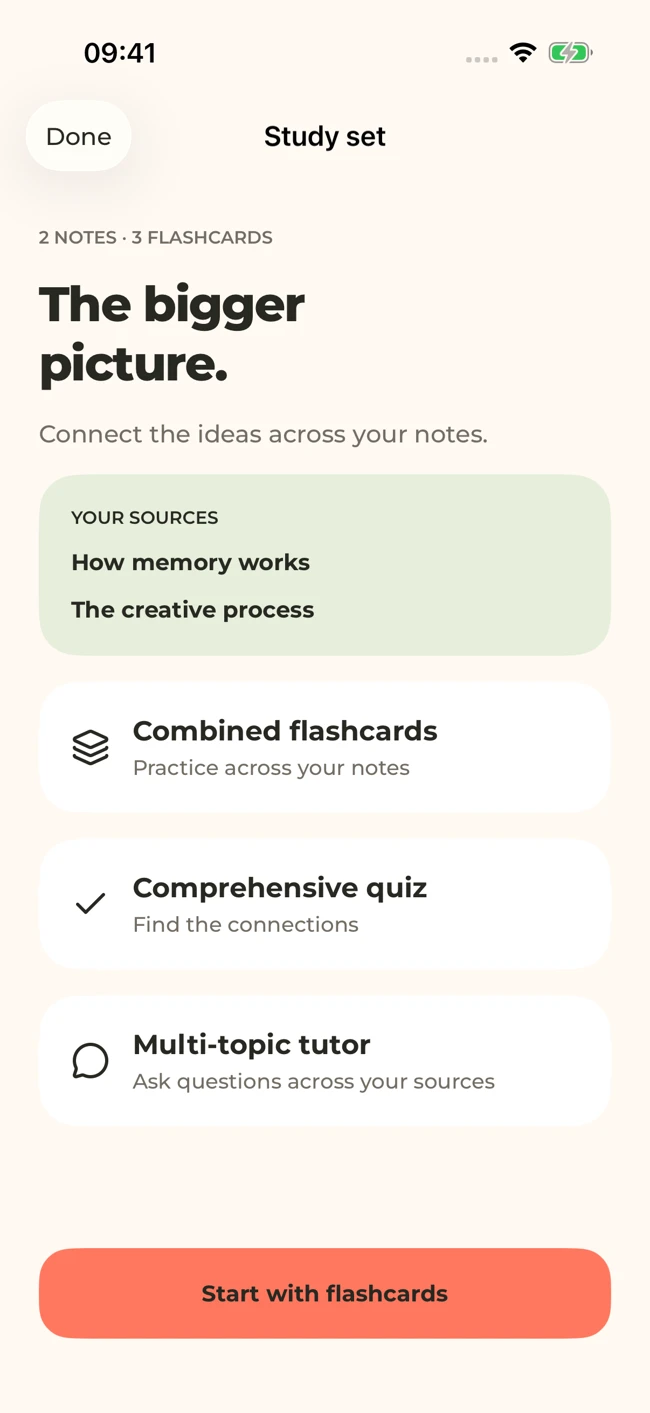
MelonNote can bring related notes into one study set. This iOS screen uses sample sources; layouts can vary by platform and version.
iPhone and Android · Features and screen layouts may differ.Start with the notes you already have.
Bring one PDF, permitted lecture recording or clear photo into MelonNote, then turn the note into a focused study session.
Free download. In-app purchases available.
How can you compare the apps without moving a whole semester?
Use a small, representative sample. Pick material that includes a definition, an example and a detail that would change the answer if omitted. This is an editorial evaluation exercise, not a claim that one tool has already passed a controlled test.
- Define the finished task. For example: answer five questions about one lecture without reading the slides.
- Use material you can check. Keep the original page or recording available.
- Create or generate a small set. Avoid choosing a tool purely by the number of cards it produces.
- Inspect the questions. Check coverage, ambiguous wording and whether a single card combines unrelated tasks.
- Attempt the answers. Familiarity with a phrase is different from explaining the idea.
- Return later. Check whether the material is easy to find and the next useful action is obvious.
- Review the actual plan. Confirm what remains available after a trial or allowance ends.
Keep your observations in the study-app comparison worksheet. Record a concrete problem, such as “lost the condition in paragraph three,” rather than a vague score such as “felt smarter.” That makes a second test useful and helps you distinguish an input problem from an app limitation.
Should you leave Quizlet at all?
Not necessarily. If your current sets match your course, your classmates use them and your routine works, switching has a cost. You may need a second tool for capture or explanation rather than a complete replacement. Our existing MelonNote vs Quizlet article focuses on that narrower decision.
Before migrating, verify export formats, imports, media handling and review-history behavior for the exact products involved. This article does not establish a direct Quizlet-to-MelonNote transfer. Keep your originals and test a small, nonessential example before relying on any migration route.
Do not maintain two copies of every card unless there is a reason. Duplicate collections can drift: one answer gets corrected while the other remains wrong. Decide which source is authoritative and where your next review will happen. A simpler routine that you can maintain may serve you better than a larger collection spread across several apps.
Common questions about Quizlet alternatives
Which option is best for lecture recordings?
Compare the capture and transcription workflow as well as the final study tools. MelonNote supports recording-to-note study; other products may offer recording, file import or AI summaries with different limits. Use a permitted sample and check important terms. For transcript-focused requirements, read MelonNote vs Otter for lectures.
Can I make cards from handwritten notes?
MelonNote can analyze a photo and generate study material from the resulting note. Legibility is the first constraint, especially for symbols and crossed-out text. The handwritten-notes workflow includes a source-check example before card generation.
Will an AI-generated deck cover everything on my exam?
You should not assume that. Compare the deck with the learning objectives and your own list of required topics. Missing material can remain invisible if you only review the generated questions. Keep a separate coverage checklist and use source-based practice alongside any app's study modes.
Check generated material against your original notes. App features, access limits, and screen labels can vary by platform and version.
Start with the notes you already have.
Bring one PDF, permitted lecture recording or clear photo into MelonNote, then turn the note into a focused study session.
Free download. In-app purchases available.