
MelonNote and Quizlet both offer ways to turn study material into flashcards and practice. If you are comparing MelonNote vs Quizlet, start with the task you repeat most: capturing a lecture, studying a PDF, practicing an existing set, or clarifying your own notes. The most useful choice is the one that fits that task from source to review.
Disclosure: this comparison is published by MelonNote. It compares publicly documented capabilities checked on October 14, 2026, and provides a practical evaluation method. It is not an independent speed, accuracy or learning-outcome benchmark. Access and features can change by plan, platform and release.
Start with the material you already have
A student who records an approved lecture needs a different starting point from a student who already has a course flashcard set. Likewise, someone revising a PDF needs to inspect extracted content before judging the resulting cards.
Write down your source, required output and device. For example: “I have lecture audio and a slide PDF. I want checked notes, a short deck and questions about unclear concepts on my phone.” This gives the comparison a concrete scope.
Avoid making a decision from a long feature list alone. A feature can exist but still be inconvenient for your particular source, access level or study routine.
Compare the documented workflows
| Study task | MelonNote | Quizlet |
|---|---|---|
| Capture spoken material | Store listings describe lecture recording and transcription | Verify the current recording route and product offering for your account; this comparison does not assume direct feature parity |
| Work from PDFs | Document import creates note content for study tools | Official pages describe PDF summarization and study-guide generation |
| Create flashcards | Generate cards from note content | Official pages describe AI flashcard generation from study material |
| Practice with questions | Generate quizzes from your notes | Official pages describe AI practice tests |
| Clarify a concept | Ask the AI tutor about your note material | Official pages describe AI homework help and explanations |
| Connect course sources | Combine selected notes into study sets | Check the available source and set organization in your current account |
| Understand cost | Free download with in-app purchases; check the purchase screen | Some access is free; advanced capabilities may require a paid subscription |
MelonNote's capabilities above are described in its App Store listing and Google Play listing. Quizlet's column is based on its official AI tools overview and AI flashcard generator page.
The overlap is substantial. Neither “Quizlet only has manually written flashcards” nor “any AI-generated deck is automatically suitable for an exam” is a sound basis for choosing.
If you begin with lecture recordings
MelonNote provides a recording-to-notes route that can lead into summaries, cards, quizzes and tutor questions. That makes it worth evaluating when the lecture itself is your main source and you want to continue studying the material in a mobile app.
Test with an approved, short recording before relying on it for a long class. Listen back, compare technical terms with the transcript and check whether the resulting note gives you enough context for practice. Our lecture recording guide explains this process.
When evaluating another product, check the exact current capture route rather than assuming that a brand name implies one particular recording workflow. Product bundles and integrations can change.
If you already have notes or flashcards
Begin with the study material you actually use. Check how you open it, find an item, attempt an answer and return to the source. An existing set may be convenient, but verify that it matches your lecturer's terminology and assessment scope.
For a PDF, use the same small document to evaluate each workflow. Inspect a definition, an exception and a diagram-related question. This is more informative than comparing two attractive sample decks on unrelated subjects.
The PDF-to-flashcards guide gives you a source-checking checklist that can be applied regardless of which product you choose.
Run your own five-part evaluation
Copy the study-app comparison worksheet. Use it to record observations rather than give a product a score from memory.
- Source quality: did the important content survive import or transcription?
- Question quality: are the generated prompts clear and their answers supported?
- Review experience: can you make an honest attempt before seeing an answer?
- Recovery: can you identify an error and find the source needed to correct your study material?
- Practical fit: do device support, access limits, purchase terms and data expectations suit you?
For each criterion, write down one example. “The term on page 3 was misread” is actionable. “The AI seems good” is not enough to guide a decision.
Where a MelonNote study set fits
If several of your notes address one course question, you can study them together. For example, a lecture note and a reading note may offer different explanations of the same concept. Keep the sources recognizable, then use cards, a quiz or tutor questions to explore the relationship.
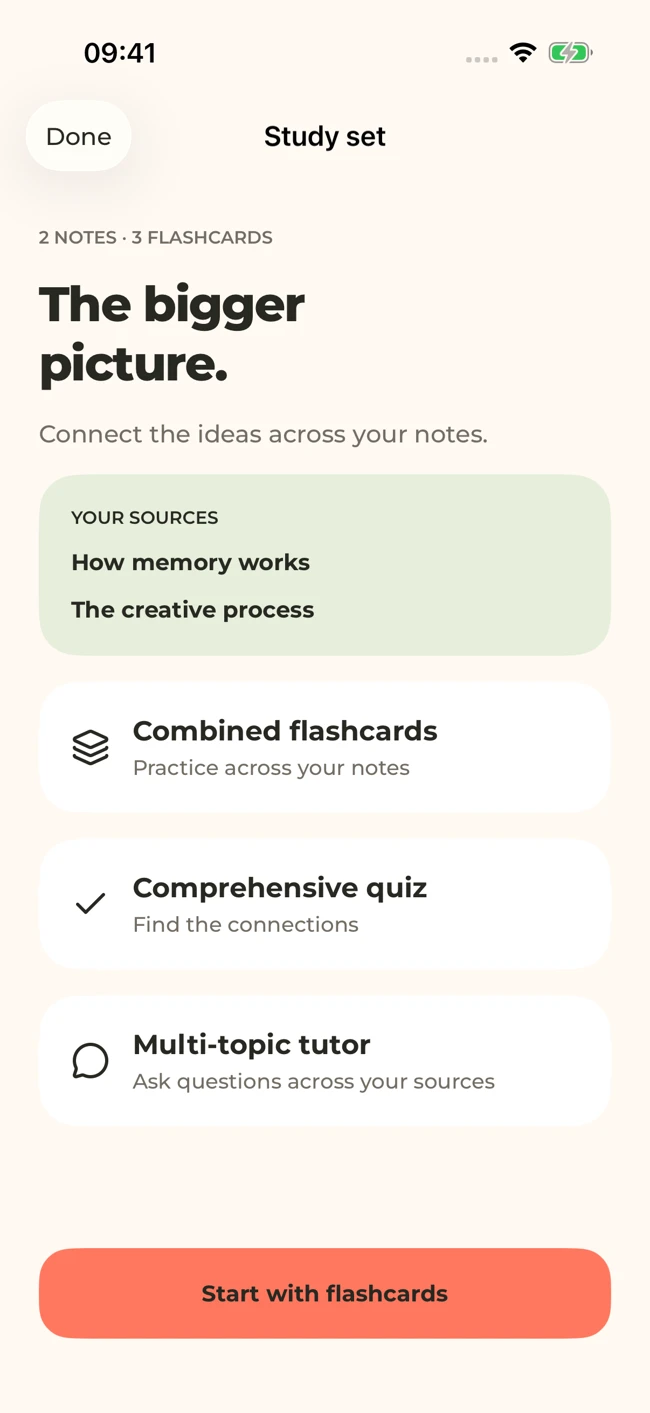
MelonNote can bring related notes into one study set. This iOS screen uses sample sources; layouts can vary by platform and version.
iPhone and Android · Features and screen layouts may differ.Our combined study-set guide describes the workflow. Combining sources is helpful when the relationship matters; grouping every note in a semester can make it harder to identify why an answer is unclear.
Try the workflow with your own material.
Start with a short lecture recording or PDF in MelonNote. Check the note, try the study tools, and decide whether the whole process fits your course.
Free download. In-app purchases available.
Check price and data expectations before committing
Compare the access you need rather than an isolated headline price. Read the current renewal period, regional price, included features and limits shown in the relevant product. Do not assume that a free download means every AI action is unlimited.
Use the current privacy information when deciding what material to process. MelonNote's privacy policy describes its handling of note content and services. For another app, read that product's own current policy. Course permission to access a document does not automatically establish permission to send it to every service.
Choose the workflow you can repeat
MelonNote is worth trying if your routine starts with your own recordings, documents or photos and continues into mobile study tools. If your existing Quizlet workflow already serves your course well, evaluate whether a change solves a specific problem before moving material.
You do not need to reorganize an entire semester to decide. Use one real source, verify the output and complete one study session. The AI study-app checklist offers more questions to help you make that decision.
Check generated material against your original notes. App features, access limits, and screen labels can vary by platform and version.
Try the workflow with your own material.
Start with a short lecture recording or PDF in MelonNote. Check the note, try the study tools, and decide whether the whole process fits your course.
Free download. In-app purchases available.