
MelonNote supports study sets made from selected notes. That lets you review connected material together rather than treating every lecture or document as an isolated file. Use the combined set for flashcards, quizzes, or tutor questions that need more than one source note.
The most useful set is defined by a question. “How do these two theories explain the same example?” gives you a reason to combine material. “Everything from this semester” may create a large collection without a clear study task.
Decide what belongs together
Choose notes that share a concept, a comparison, a process, or an assessment goal. A lecture and its supporting PDF often belong together. Two lectures that use different terms for a similar mechanism may also make a useful pair.
Keep unrelated material out of the first session. Combining more notes does not automatically create a better explanation. It can make the source of an idea harder to identify and increase the chance that you overlook missing context.
Before selecting the notes, write a sentence beginning, “After this session, I want to explain…” That sentence is your test for including a source. If a note does not help answer it, save it for another session.
Check the individual notes first
A combined set inherits the quality of its sources. Review transcripts and extracted text before combining them. Resolve obvious spelling mistakes, missing conditions, and mislabeled examples in your own working material.
Look for overlap and disagreement. Two notes might describe the same idea at different levels of detail. They might also use a term differently because the context changed. Do not ask the AI to silently smooth those differences into one statement.
Retain recognizable note names. “Week 4 · observational learning” and “Seminar · modeling example” are easier to distinguish during review than two files called “Psychology notes.” The organization article offers a simple naming pattern.
Create the combined study session
Open your notes in MelonNote and use the selection or study-set workflow to choose the relevant material. Start the combined study tools offered by your version. The app listings describe multi-note flashcard, quiz, and tutor workflows; exact labels may vary by platform.
Start with a small group of notes so you can evaluate the result. Before relying on a generated answer, confirm that it represents the selected material rather than a generic overview of the topic.
If your version presents study tools differently, begin with the individual notes and consult the app’s current controls or support. The goal is a coherent session, not matching a website’s button name character for character.
Explore the iOS study set
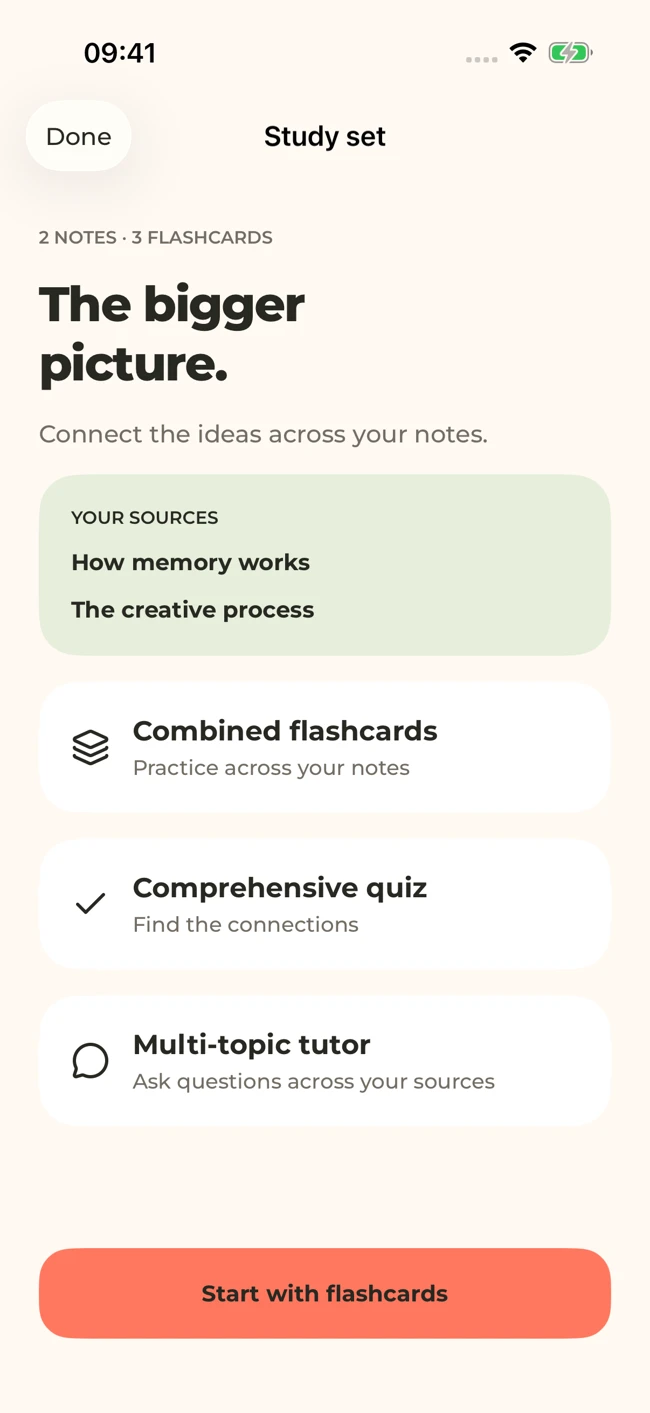
The iOS study set groups the choices under Study set: Combined flashcards, Comprehensive quiz, and Multi-topic tutor. The screenshot below shows a set containing two demonstration notes.
Ask questions that cross the notes
A combined set should do something a single note cannot. Ask what the sources agree on, where they differ, and what one contributes to the other.
Useful illustrative questions include:
- Which concept from the lecture helps explain the case in the seminar note?
- What assumptions distinguish the two models described here?
- Which points appear in both sources, and which appear in only one?
- Does this example support either interpretation, or is information missing?
Verify the answer by returning to both sources. Do not assume the tutor provides formal source citations unless the app actually displays them. A sensible explanation can still attribute a claim to the wrong note.
Test both knowledge and connections
Use flashcards for terms and contrasts, then a quiz for broader checks. Add a short explanation task: describe the connection between two ideas without looking at either source.
For example, after combining a lecture on memory with notes on a study method, explain what the method asks you to do and how the lecture’s concepts help interpret it. Separate the course’s evidence from your own proposed application.
If you can answer facts from both notes but cannot explain their relationship, more fact cards may not solve the problem. Draw a comparison table, create a new example, or ask a focused tutor question about the missing link.
Handle contradictions openly
When two sources disagree, keep the disagreement visible. Check dates, definitions, assumptions, and whether one passage refers to a special case. If the difference remains, ask your teacher or consult the assigned reference.
An AI-generated synthesis should not erase a real debate. In subjects with competing interpretations, the disagreement may be exactly what you need to learn. Make a question about the evidence or assumptions rather than memorizing a false consensus.
Close with a smaller next step
Write down one connection you can now explain and one you still need to check. Return to the weakest source or concept before adding more material. A study set can grow over time, but it should remain understandable.
For a group session, agree on the same source set and compare reasoning before revealing answers. Our study-group routine shows how to keep that discussion focused. For solo revision, use the comparison exercise to test the boundary between closely related concepts.
Check generated material against your original notes. App features, access limits, and screen labels can vary by platform and version.
Put this into practice.
Start with one useful note in MelonNote. Turn it into questions you can answer, ideas you can explain, and a reason to come back tomorrow.
Free download. In-app purchases available.